
06 / Subscription tracker
Pulsub
A calm subscription tracker. Add what you pay for each month or year and see what it all costs, what renews next, and how every price has changed. Any currency, no bank login.
Visit pulsub.com ↗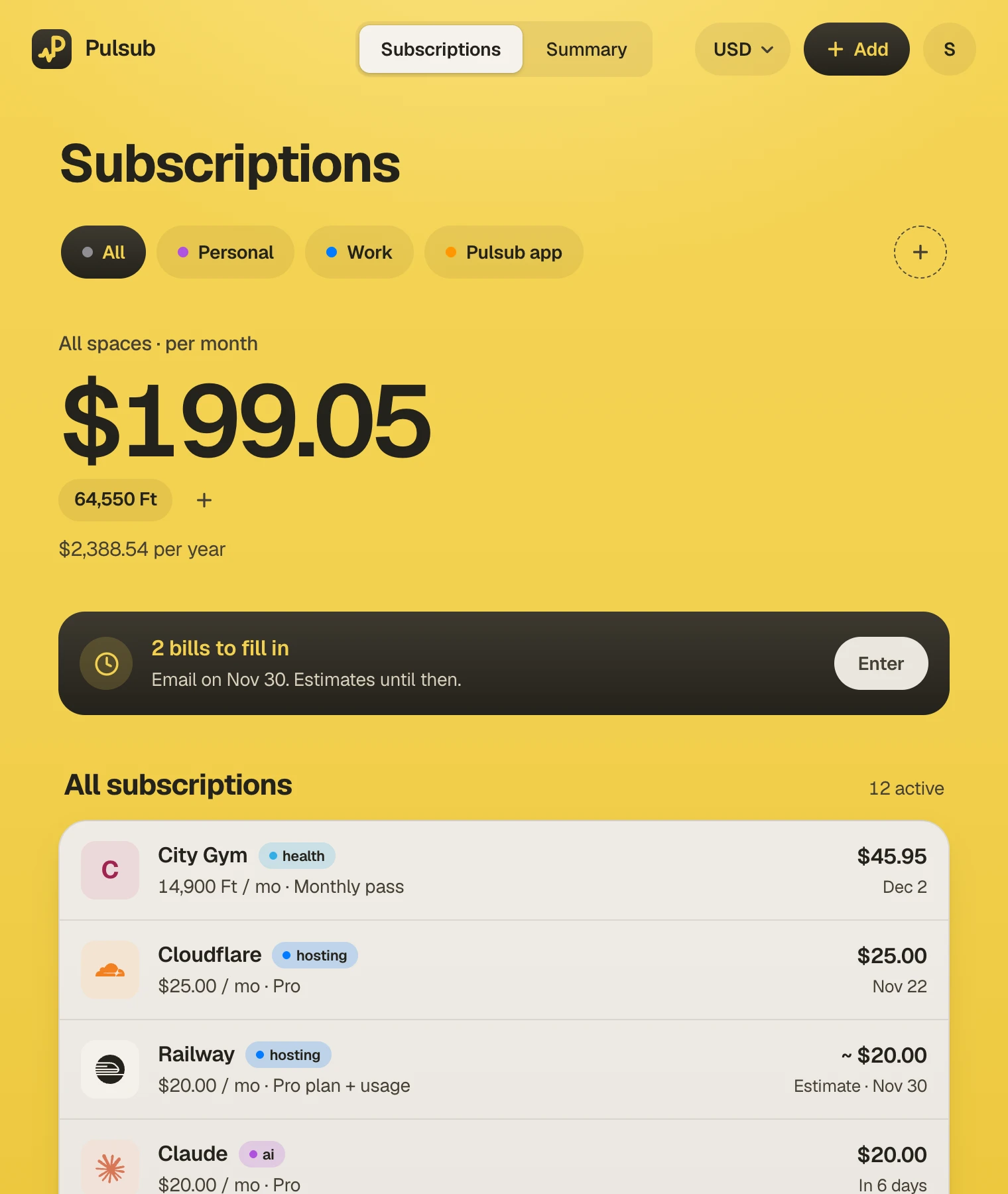

01 / Context
One question, answered fast
Most people cannot say what they pay for subscriptions each month, let alone each year. Pulsub exists to answer that one question: what am I paying, and where does it go? It is built for people with a pile of streaming, gym, hosting and AI bills, some at a flat price and some that change every month.
It is manual by design. There is no bank linking and no card or login to hand over. You add what you pay for, and that is a feature, not a gap.
02 / The dashboard
Your whole month on one screen
One total for the month and one for the year, in the currency you choose, with every subscription listed below and what renews next in plain words. Work, personal and side projects live in separate spaces, or together under All spaces. Adding a subscription starts from a library of popular services, so most need only a price and a date.
- 01Spaces for work, personal and projects, with an All spaces roll-up
- 02Every subscription keeps its own currency; totals show in yours, with the original price beside it
- 03Renewal dates that roll forward on their own, shown as “In 6 days”
- 04Tags and colours to group by music, video, hosting, AI and more
- 05A prompt on the dashboard when changing bills are waiting for a real amount
Dashboard on desktop and phone
03 / Subscription detail
Know what each one costs
Every subscription has its own page: what you have spent this year, where it will land by December, and every price change along the way. Bills that vary, like hosting or AI usage, count as estimates until you enter the real amount, so totals never pretend to be more certain than they are.
- 01Spent so far this year and the expected year-end total
- 02Price history, month by month
- 03Fixed and changing bills side by side, with estimates clearly marked
- 04Month-end reminders to fill in changing bills, with a link straight to the page


A subscription page on desktop and phone
04 / Summary
See where the money goes
Switch between monthly and yearly, and split the total by space, tag or subscription. A bar for every month shows the trend at a glance, and estimated months are hatched until the real amount is in.


Yearly summary on desktop and phone
05 / Build
Small product, real backend
Pulsub is a React app with a small Node.js API and PostgreSQL. Accounts use email and password, with email confirmation and password reset, and transactional email goes out through Resend. The public site is prerendered for search, and a library of services with price pages and guides supports people researching what subscriptions cost. The app deploys on Railway.
06 / Current state
Live, and free to start
Pulsub is live at pulsub.com. The free plan covers one space and ten subscriptions, with totals, summaries, price history and any currency. Supporting Pulsub is optional: it lifts the limits and keeps the app simple and ad-free. It works in the browser and is not a phone app, and it does not cancel subscriptions for you.